How it works
From a note on site to a payment out the door. No chasing.
Kipso handles the six steps between "we found a problem on site" and "the contractor got paid the right amount." Its AI does the project management work: drafting, routing, checking, alerting and reporting. Named people make every decision.
1 · Capture
Start from what the field already sends
A project manager records a voice note on a site walk ("Building B corridor: the ceiling is open and the existing sprinkler mains are bad"), or the GC emails a proposed change. Kipso keeps it as a field note tied to the project and location, and flags any note nobody has acted on.
In the demo Field notes with photo references and voice-note text. Planned Installable mobile capture that works offline.
- A project manager records a voice note on the site walk.
- Kipso turns it into a draft change order: scope, cost code, contract and fund.
- It shows the hit to contingency before anyone approves anything.
2 · Draft
A change order that's ready to review
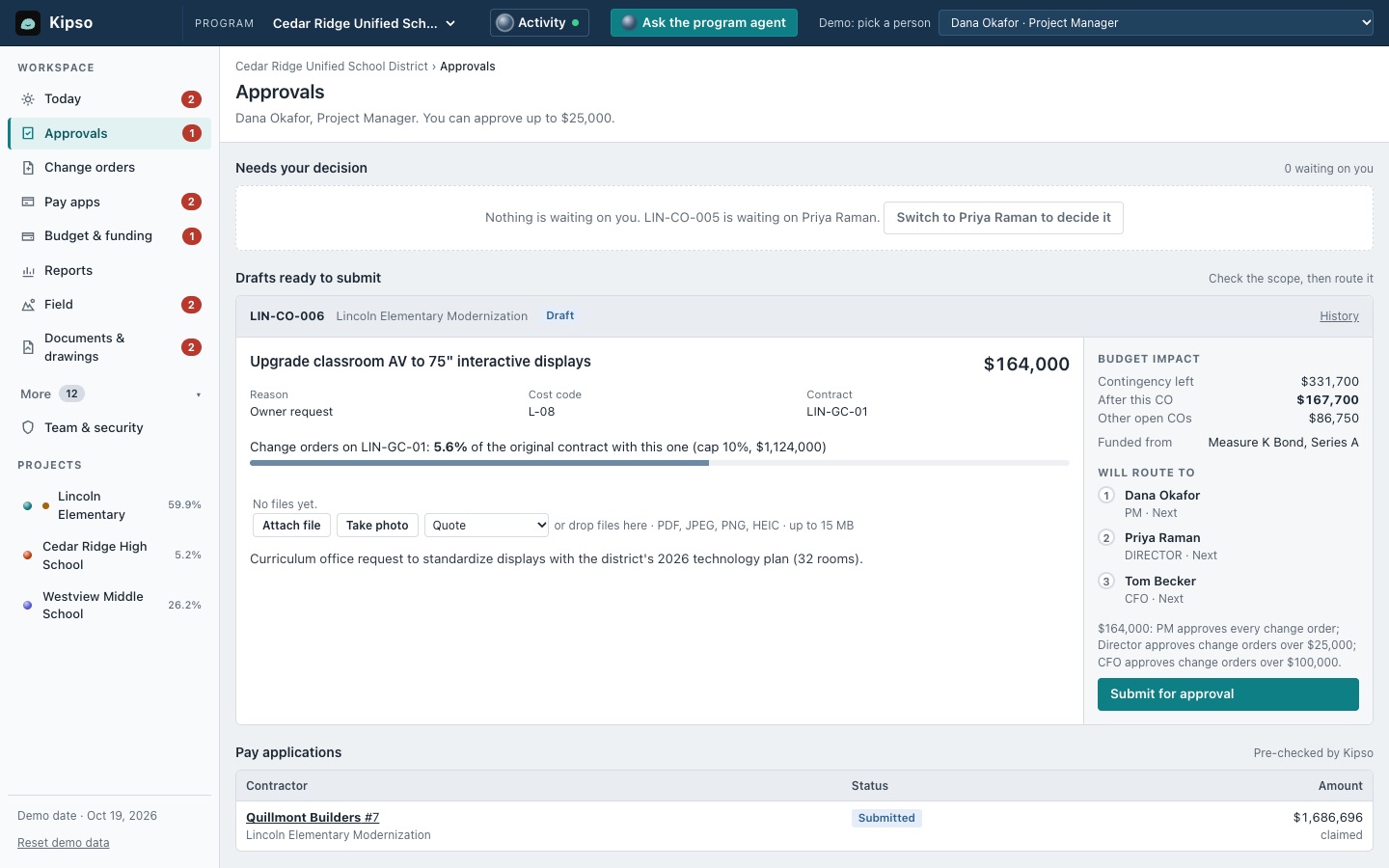
Kipso writes the scope, picks the cost code and contract, chooses the fund your funding rules allow, and shows the budget impact: contingency left now, after this change order, and after everything else that's open.
It also follows your funding rules. In the demo, a state matching grant can't pay for change orders, so they fall to bond contingency automatically.
3 · Route
Your delegation of authority, enforced
Approval rules come from your written policy: dollar tiers, plus rules such as "anything over remaining contingency goes to the board." Kipso sends each change order to exactly the people the policy names, in order, and explains which rule sent it there.
Only the person it's waiting on can approve it. When one sits too long, Kipso drafts the reminder. When the last approval lands, the change order is added to the contract and the budget moves out of contingency.
The demo's policy: the PM approves every change order, the director anything over $25,000, the CFO over $100,000, and the board over $250,000 or anything larger than the contingency left. Planned Approve or reject straight from email or Microsoft Teams.
- Approvers come from your policy. Over $100,000 means the PM, then the director, then the CFO.
- When it stalls, Kipso drafts the reminder.
- Each approver can act only when it's their turn.
- Final approval adds it to the contract and moves the budget out of contingency.
4 · Check

Every pay app checked before anyone certifies it
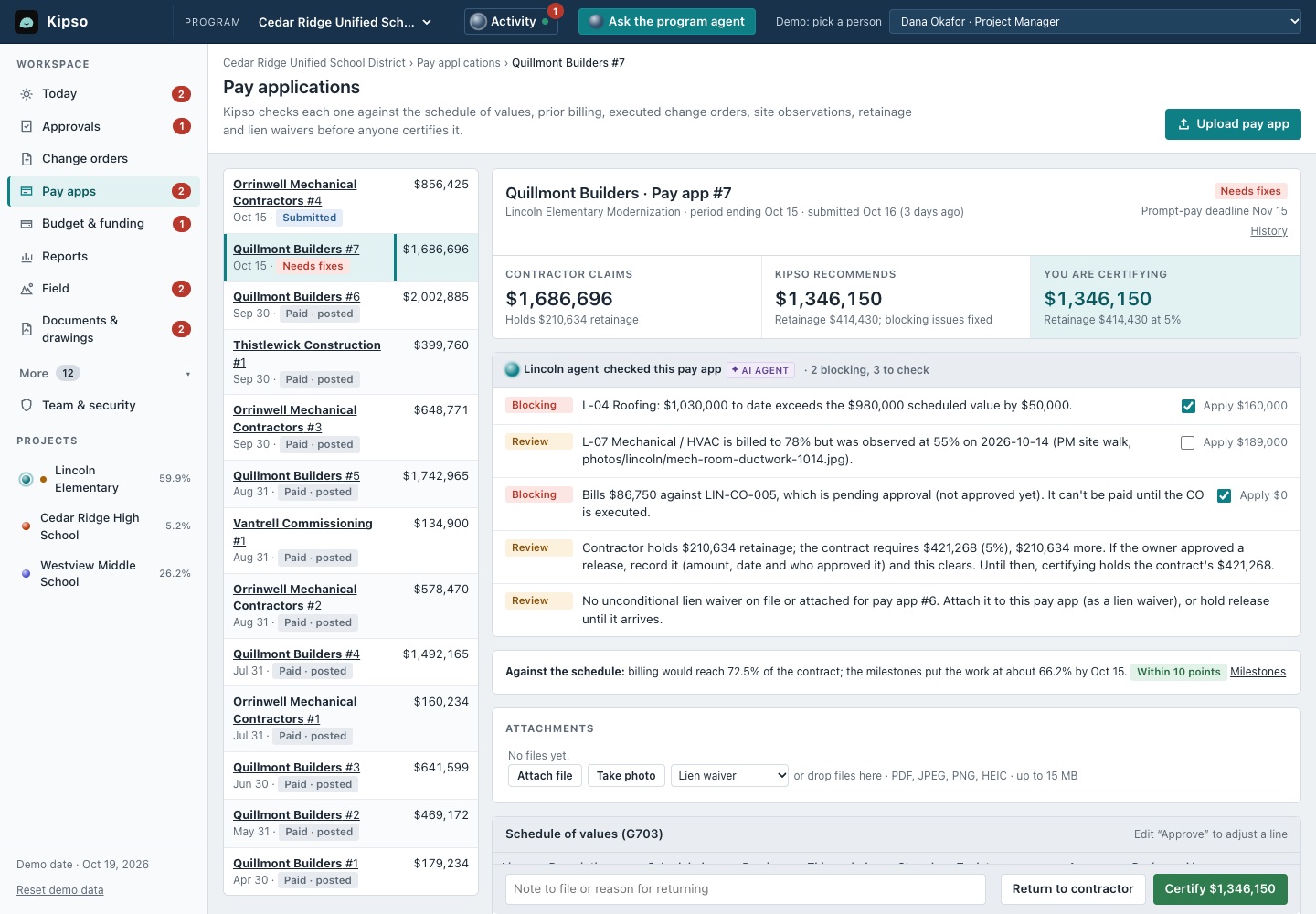
The GC uploads its AIA G702/G703 as a PDF. Kipso reads every continuation-sheet line, matches it to the schedule of values or an approved change order, and runs the checks your best project accountant would run if they had the time.
- Over the scheduled value. A line billed past what the contract allows.
- Unapproved change orders. Billing against work nobody has approved yet.
- Ahead of the work. Percent complete compared with what was seen on site.
- Retainage. Held at the rate the contract requires.
- Prior billing. "Previous" columns that don't match what you certified last month.
- Lien waivers. Missing waivers for the last payment.
- Prompt-pay deadline. How many days you have left.
Lines it can't match with confidence come back for a person to decide; Kipso doesn't guess. The screen shows three numbers side by side: what the contractor claims, what Kipso recommends, and what you are about to certify. Certification is blocked while blocking problems remain.
In the demo Reads contractor pay-app PDFs, runs all the checks above and makes line-by-line adjustments. Planned A contractor portal so GCs submit through a link.
- The contractor's pay app arrives as a PDF. Kipso reads every line.
- Each line is checked against the contract, approved change orders and what the PM saw on site.
- Fixes are applied line by line, and the amount to certify updates as you go: $1,686,696 claimed, $1,346,150 to certify.
- Nothing is certified until a named person signs.
5 · Post
Certified amounts reach accounting without retyping
When a pay app is certified, Kipso writes the AP invoice split across funding sources and GL accounts, and drafts the note to the contractor. It happens when the approval happens, not in a nightly batch.
The first version produces a CSV mapped to your system's import format, imported by your finance team, mapped once with them. Live connections to accounting systems may come later, one system at a time.
In the demo An accounting import file, mapped once with finance, with each certified amount split by fund. Planned Live connections to accounting systems, one system at a time.
- The moment a pay app is certified, the invoice is written.
- It's split across funding sources for accounting, with no retyping.
- Meanwhile Kipso watches the program and flags what needs a person, with the next step drafted.
6 · Watch
Problems surface before the board or council meeting
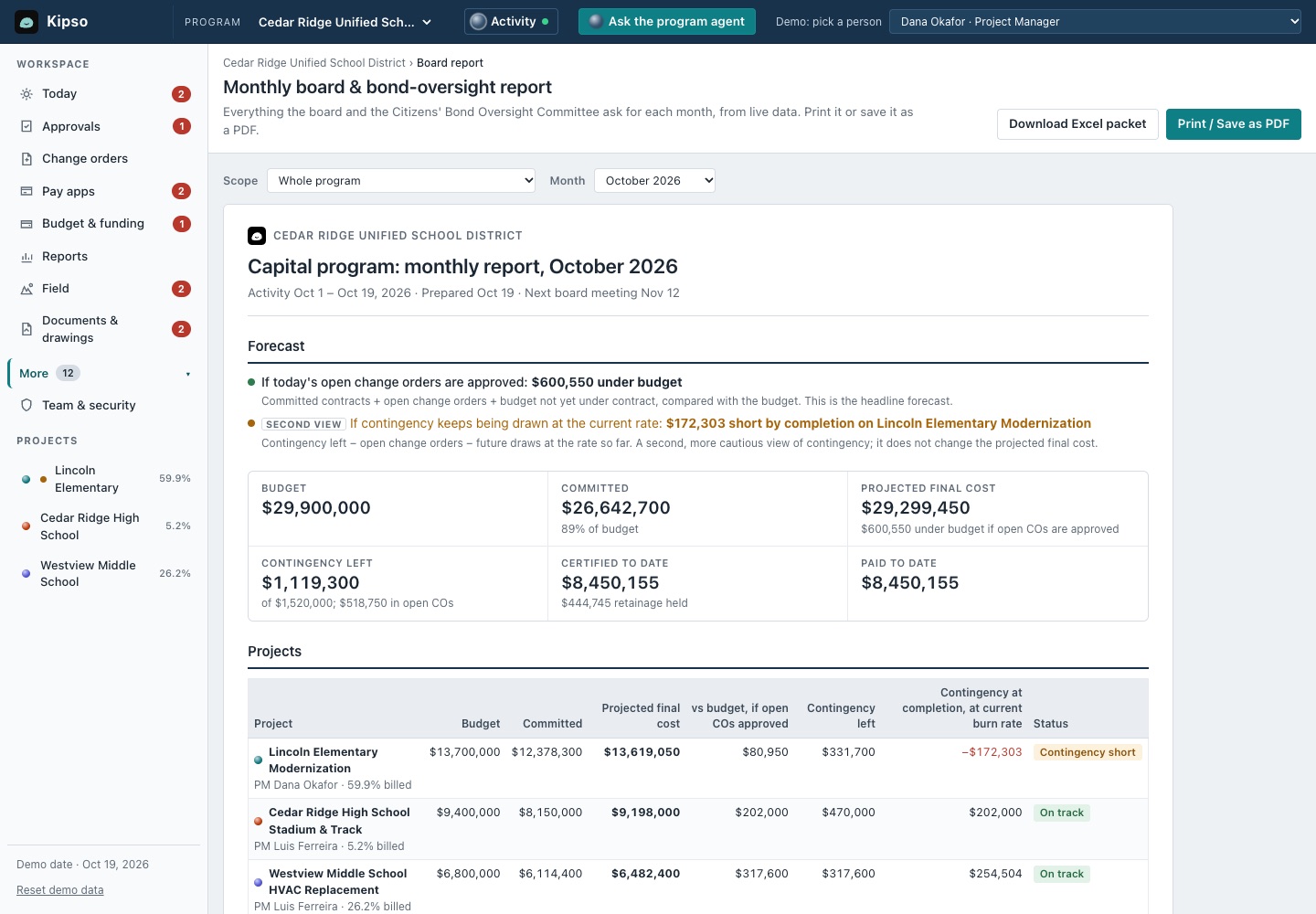
Kipso watches the whole program and lists what needs a person, most urgent first, each with a next step: contingency that won't last to completion, approvals that have stalled, pay apps near their prompt-pay deadline, funds that are overcommitted and field notes nobody has picked up.
The forecast shows its arithmetic line by line, and the monthly board report is built from the same numbers.
Where the AI fits
Your AI teammate prepares. You decide.
Kipso uses an AI agent for the reading and writing: reading pay-app PDFs, drafting change-order scope, writing reminders and the board narrative. Every approval, certification and publication is done by a named person. Approvals, certifications and agent actions are recorded with the person and time in an append-only, hash-chained audit log. Signed-in people are recorded as themselves; actions taken with a workspace's setup key or in the public practice sandbox are recorded under the name given and labelled as not signed in.
Use it from your AI assistant
Your team's own assistant can work with live project data under the same approval rules. It works with Claude today; other MCP-compatible assistants, such as ChatGPT, may work but we haven't tested them yet. How it works
Changes are also recorded as events other systems can read through the API. Planned Webhooks and API keys for IT teams.
A bonus, not a requirement
Already use Claude or ChatGPT? Bring it along.
You don't need anything but Kipso itself. But if your team already uses an AI assistant, it can connect too (through MCP, the Model Context Protocol), so you can ask "What's waiting on me?" or "Draft a change order from this field note" and get answers from live project data.
- The same approval rules as the app: only the person a change order is waiting on can approve it, and approvals are logged with the person and time.
- Works with Claude today. Other MCP-compatible assistants, such as ChatGPT, may work depending on your plan; we haven't tested them yet.
- In the demo A working MCP server with dozens of tools, used from Claude today.
What's waiting on me?
Checked Kipso: approvals, pay apps
One change order is waiting on you, Priya:
Approving it leaves Lincoln with $244,950 of contingency. Also on your radar: Quillmont's pay app #7 ($1,686,696 claimed) has two blocking issues, so Dana hasn't certified it. The prompt-pay deadline is Nov 15.
Approve LIN-CO-005Open pay app #7
- Executive sponsor: Every project's budget, contingency and risk in one place, and the board or council report built from live numbers.
- Implementation lead: Setup from the files you already keep, clean data in one place, and far fewer manual steps.
- Finance: Numbers that reconcile to the books by fund, a prompt-pay deadline on every pay app, and an audit trail of who approved what.
- Purchasing and contracts: Bids through to award, vendor standing (prequalification, insurance and licenses), and contracts and change orders in one record.
- IT: No heavy IT project: clear data handling, accounting exports as a CSV mapped to your system's import format, imported by your finance team, and moving data in with Kipso Bridge.
- Daily users: Drafted change orders, pay apps that arrive already checked, documents and submittals in one place, and a contractor portal (in development).
Common questions
Who approves change orders: the AI or our staff?
Your staff. The AI drafts the change order and routes it to the people your policy names, in order. Only the person it's waiting on can approve it.
How do contractors send pay apps?
Today contractors send their AIA G702/G703 pay app as a PDF, and Kipso reads every line and checks it. A contractor portal for submitting pay apps and change requests through a link is in development.
What happens when the AI isn't sure about a pay-app line?
It doesn't guess. Lines it can't match to the schedule of values or an approved change order with confidence come back for a person to match, and nothing is created until they're resolved.
Do we need IT to connect our accounting system?
No IT project to start. Kipso produces a CSV mapped to your system's import format, imported by your finance team, mapped once with your finance team. Live connections to accounting systems are planned, one system at a time.
Can certification go through with problems still open?
No. Certification is blocked while any blocking finding remains. Warnings are the project manager's call, and they can accept or override each suggested fix.
Can we use it from ChatGPT or Claude?
It works with Claude today through MCP, the Model Context Protocol. Other MCP-compatible assistants, such as ChatGPT, may work depending on your plan; we haven't tested them yet. The same approval rules apply as in the app.
Watch the loop run end to end
In 30 minutes we'll take a field note to a certified, posted payment in the demo.